 Horean's Blog


LeanCloud停止对外服务&第一次博客迁移


起因
哈喽大家好,又已经一个多月没有发表过文章了,毕竟高一的期末考备考也是很重要的,这直接关乎以后的分班(我们已经分完班啦——当然我还是在我校最优秀的那个班😁٩(•̤̀ᵕ•̤́๑)ᵒᵏᵎᵎᵎᵎ)
让我没想到的是,回来一看个人博客发现天塌了,我的博客评论系统 Waline 所使用的数据存储服务的提供商 LeanCloud 即将停止对外服务,其在公告中明确写出将于2027年1月12日正式停止所有对外服务(详见停服公告原文)。这真的是非常恐怖😱的一件事情,不然等到评论数据全部被销毁之后可就麻烦了。
虽然 Waline 官方有针对这一问题提出解决方案,就是利用如 MongoDB AtLas 等其他提供一定免费额度的数据库来替代原来 LeanCloud 的位置,按照这个步骤确实可以完美迁移评论数据。但是吧,鉴于目前已放寒假,时间稍微充足一些(仅充足一点点,作业非常非常多🤢),且我在一段时间以前就已经想把原来的博客主题 Redefine 换掉了(不能说不美观吧,也挺简洁的,就是总感觉哪里缺了点什么,整个界面看起来不太简约,总之就是风格我有点不太喜欢[我也不知道我之前为什么会选择这个主题🤔]),于是在种种因素的加持下,我选择了更换主题并迁移评论数据。
主题的选择
受到我的线上朋友 小改学习志 和 Virelyx (现 路明笔记) 的影响,一说到更换主题,我就在考虑是否可以购入一台云服务器并部署一款由 神秘布偶猫(Oyiso)开发的动态博客主题。但是仔细想想,还是觉得有些没必要,毕竟云服务器的购入成本不会很低,维护成本也不少,还不如继续用一款静态博客主题呢。
但是在 Hexo 的主题花园中,我同样没有找到一款我个人认为比较优秀的主题,况且利用 Hexo 部署个人博客,我发现在切换页面内容的次数多了之后整个页面就会变得很卡,相较之下美观与否就显得不那么重要了,因为性能才决定着体验!
于是我又将目光转向了 Astro,为什么呢?因为 Astro 区别于其他框架最大的一个特点就是:它是真的会尽量减少客户端 JavaScript 脚本文件的数量,将几乎所有动态任务交给服务端,以获得最佳的客户端性能体验。这么一看,不就对了吗——这正是我们想要的性能优化啊!当然,只有高性能而没有美观界面也肯定是不够的,这就要说到 Astro 最大的缺陷了:很多好看的主题需要付费,而免费主题大多数都没有好的效果——真的很难在成效与成本之间达到平衡😢。不过好在这真就让我挖到宝藏了!没错,就是 Fuwari 主题!当然我不是在之前没有讲过这个主题,而是真的找不到比它更加优秀的免费主题了,所以——直接开始迁移
——了吗?
显然不是,因为我很快就发现:原生 Fuwari 并不支持评论系统,而且我还需要更进一步的优化(例如文章目录、站点统计等等),这些都是原生 Fuwari 没有的,那么接下来就有两种选择:
- 自己对 Fuwari 进行改造,实现想要的功能
- 直接应用其他的二创主题模板
这应该不用说了,能偷懒肯定还是先偷懒啊(其实是因为自己还没有达到进行完美改造的水平),有别人造好的轮子能不用么?
所以,我最终选择了一款清新的基于 Fuwari 的二创主题 Firefly,Git仓库地址在此处,演示站在这里,它还配备有比较详细的官方文档,社区支持还不错吧,而且这里基本上有我想要的大部分功能。
简单来说,Firefly 是这样的一款主题:
Firefly 是一款基于 Astro 框架和 Fuwari 模板开发的清新美观且现代化个人博客主题,专为技术爱好者和内容创作者设计。该主题融合了现代 Web 技术栈,提供了丰富的功能模块和高度可定制的界面,让您能够轻松打造出专业且美观的个人博客网站。
- ⚡ 静态站点生成: 基于Astro的超快加载速度和SEO优化
- 🎨 现代化设计: 简洁美观的界面,支持自定义主题色
- 📱 移动友好: 完美的响应式体验,移动端专项优化
- 🔧 高度可配置: 大部分模块均可通过配置文件自定义
那么最终我选择迁移的主题就确定了:Firefly!这次是真的可以开始迁移了!
配置新主题
最开始肯定还是依照官方文档的步骤,先把项目环境搭建好并部署。接下来再进行项目配置的修改,Firefly 区别于 Fuwari 最明显的点是它的配置文件从 src/content.config.ts 单一文件变为了 src/config/ 一整个文件夹📂里面分类整理好的不同配置文件,这样确实对提高配置效率有着明显帮助。
配置文件树结构大致如下:
src/├── config/│ ├── index.ts # 配置索引文件│ ├── siteConfig.ts # 站点基础配置│ ├── backgroundWallpaper.ts # 背景壁纸配置│ ├── profileConfig.ts # 用户资料配置│ ├── commentConfig.ts # 评论系统配置│ ├── announcementConfig.ts # 公告配置│ ├── licenseConfig.ts # 许可证配置│ ├── footerConfig.ts # 页脚配置│ ├── FooterConfig.html # 页脚HTML内容│ ├── expressiveCodeConfig.ts # 代码高亮配置│ ├── sakuraConfig.ts # 樱花特效配置│ ├── fontConfig.ts # 字体配置│ ├── sidebarConfig.ts # 侧边栏布局配置│ ├── navBarConfig.ts # 导航栏配置│ ├── musicConfig.ts # 音乐播放器配置│ ├── pioConfig.ts # 看板娘配置│ ├── adConfig.ts # 广告配置│ ├── friendsConfig.ts # 友链配置│ ├── sponsorConfig.ts # 赞助配置│ └── coverImageConfig.ts # 文章封面图配置页脚配置
这上面的配置基本上都很轻松,但是我还得要为页脚再添加一些东西,如 盟国ICP备案 的信息之类的,不然我的个人博客很有可能被取消备案(虽然对我也没有什么实质影响),那这里就要先把配置文件 src/config/footerConfig.ts 中 enable 改为 true:
export const footerConfig: FooterConfig = { // 是否启用Footer HTML注入功能 enable: true,};接下来就要在 src/config/FooterConfig.html 中写上需要添加的页脚内容的HTML5代码:
<div class="flex flex-wrap flex-row gap-2 justify-center mt-2"> <a href="https://www.travellings.cn/go.html" target="_blank" title="开往 | 友链接力"> <img src="https://img.hxrch.top/travellings.svg" alt="开往 | 友链接力"> </a> <a href="https://icp.gov.moe/?keyword=20251935" target="_blank" title="萌ICP备20251935号"> <img src="https://img.hxrch.top/moe1935.svg" alt="萌ICP备20251935号"> </a> <a href="https://icp.redcha.cn/beian/ICP-2025080030.html" target="_blank" title="茶ICP备2025080030号"> <img src="https://img.hxrch.top/cha080030.svg" alt="茶ICP备2025080030号"> </a></div>评论配置
终于要开始配置评论系统了💬,我觉得这应该算是本次迁移过程中难度最大的一步了。
迈出第一步,正如文章开头提到的,目前的 Waline 需要将存储服务从 LeanCloud 更换为一种数据库,这看上去倒是没有什么问题。但是,就这么说吧,Waline 不是不行,而是将其嵌入到这个新主题 Firefly 中感觉其外观有点不太协调——在我看来,Waline 比较适合放在我原来的博客主题 Redefine 中。所以从美观的角度上来讲,我就应该使用另外一种评论系统了,那到底该哪一种好呢?
嗯,没错,就是 Twikoo!在经过对比之后,我发现 Twikoo 可以完美适配 Firefly 这个主题,况且 Twikoo 在功能上与 Waline 其实并没有太大差别,甚至在某种程度上可以说 Twikoo 比 Waline 的配置更加方便,并且 Twikoo 的配置选项好像也更多一些。
到这里,就可以正式开始配置 Twikoo 了。
第一步:配置 MongoDB Atlas
没错,与 Waline 相同,Twikoo 也需要用 MongoDB Atlas 作为数据库,虽然有点麻烦,但是为了各位来访者们更佳的阅读体验,这还算不了什么!
这一步的配置过程与官方文档上的说明完全一致,这里就不再过多赘述,但是请务必记住保存 MongoDB 数据库连接字符串!后面的步骤需要用到。
第二步:云函数部署
这里官方提供了好多种部署方式,包括 腾讯云、Vercel、Netlify、Railway 等等服务商,我这里选择的是 Vercel,因为我一直以来所有的线上服务都是部署在 Vercel 上的,比较习惯。
这一步与官方文档上的说明也完全一致,注意最后需要为这个服务绑定自己的域名以便国内访问,并记下该域名。
第三步:前端部署
到这里就可以完全把官方文档关掉啦!因为 Firefly 内置了 Twikoo 的前端模板,所以我们只需要在配置文件 src/config/commentConfig.ts 中进行修改即可(其中评论系统类型 type 改为 twikoo,评论系统配置中的 envId 写上刚才在 Vercel 中为这个服务绑定的自定义域名):
export const commentConfig: CommentConfig = { // 评论系统类型: none, twikoo, waline, giscus, disqus, artalk,默认为none,即不启用评论系统 type: "twikoo",
//twikoo评论系统配置 twikoo: { envId: "https://blog-twikoo.hxrch.top", // 设置 Twikoo 评论系统语言 lang: "zh-CN", // 是否启用文章访问量统计功能 visitorCount: true, },
/* ... */};第四步:配置 Twikoo
待 Twikoo 在博客上成功部署后,就可以点击评论区右侧的小齿轮按钮对评论系统进一步配置啦!里面可以设置博主的昵称、邮箱以及网址,需要注意的是 Twikoo 中的所有评论者的头像图片都源于 WeAvatar(当然还可以在 Firefly 配置文件中更改为其他的头像储存商),要想自定义头像,需要在 WeAvatar 注册并为相应的邮箱上传头像图片。
此外,配置博客评论系统当然还少不了配置邮件通知这一环节,这是非常非常至关重要的一步,是连接博主与访客的紧密桥梁,是优秀博客网站的极大体现。鉴于我的上一次博客网站并没有成功配置评论邮件通知,所以我这一次要狠狠地弥补这个遗憾!为了能够成功配置邮件通知,我总结了一下我之前失败的原因:要么是例如 Outlook 这种已经完全关闭 SMTP 服务的邮箱不可行;要么是像 网易免费企业邮箱 这种我无论怎么配置、怎么调试都行不通的邮箱(我觉得大概率还是我个人的技术原因吧[skill issue])。
所以这一次,我打算选择另外一家企业邮箱服务商!
看到市面上这类服务商有很多,不论国内国际都一样,就例如 Mailgun、Mailjet 等等。而我也不知道为什么,我就找到了另外一家不太知名但是体验还不错的服务商 Resend,它提供的免费额度(100条/天 且 3000条/月,详见 Pricing · Resend)其实足够我这种小型博客网站了。那么在我注册账号、添加域名、添加域名DNS记录并申请 API Key(很重要,后面要用)等一系列操作之后,就应该在 Twikoo 管理面板上配置其 SMTP 等内容了:在其 配置管理 选项卡下找到 邮件通知,在里面进行如下配置:
| 选项 | 内容 |
|---|---|
| SENDER_EMAIL | bot@hxrch.top(发送者邮箱,[@]后面需是刚刚在 Resend 中绑定的域名) |
| SENDER_NAME | 评论提醒 - Horean’s Blog |
| SMTP_HOST | smtp.resend.com |
| SMTP_PORT | 465 |
| SMTP_SECURE | true |
| SMTP_USER | resend |
| SMTP_PASS | <刚刚申请的 API Key> |
接下来就可以到 Twikoo 管理面板中 配置管理 选项卡下的 邮件通知测试 中输入测试接收者邮箱进行邮件通知测试啦!
如果正确注册并配置 Resend 账号并完全严格按照上面这个模板进行 SMTP 配置,那么不出意外,这里就应该会测试成功!
测试成功之后,就该关注访客评论和收到回复后收到邮件通知的内容啦!对此,Twikoo 提供了一套相应的模板变量,包含评论者的昵称、邮箱、网址、IP地址等信息,所谓配置内容模板,就是要在充分利用这些模板变量的前提下做到页面美观(不追求美观就直接罗列模板变量即可😊)。内置模板变量如下:
| 模板字段 | 字段含义 |
|---|---|
| ${SITE_URL} | *站点地址(根目录,无资源路径) |
| ${SITE_NAME} | *站点名称 |
| ${NICK} | *评论者/回复者昵称 |
| ${COMMENT} | *评论者/回复者评论内容 |
| ${IMG} | *评论者/回复者头像 |
| ${POST_URL} | *评论博文地址 |
| ${MAIL} | 评论者/回复者邮箱 |
| ${PARENT_NICK} | 被回复者昵称 |
| ${PARENT_COMMENT} | 被回复者评论 |
| ${PARENT_IMG} | 被回复者头像 |
上述表格中 字段含义 前面标星号(*)代表评论和回复两个模式都包含这个字段
接下来要做的便是写邮件HTML5模板,当然,我目前没有那么多精力完全由自己打造一款,所以我就在互联网上借鉴了一款邮件通知模板并稍作改进。成品参考图如下:
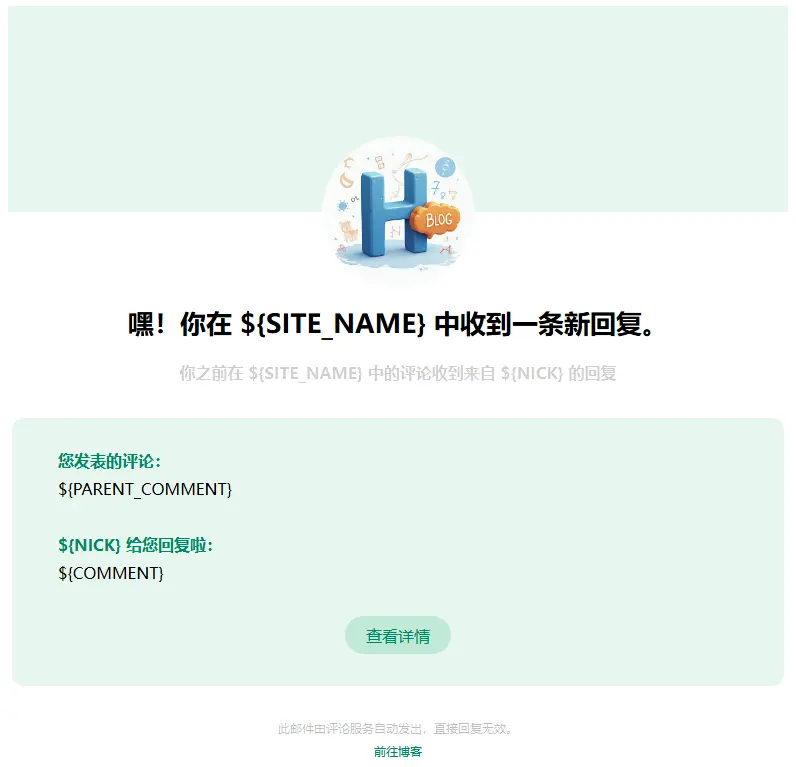
实现代码大致如下(分为评论模式[master] 和 回复模式[visitor])(使用时请往下找到压缩版本以提升加载速度):
代码中高亮部分需要替换为自己的博客图标地址!
<div class="page flex-col"> <div class="box_3 flex-col" style=" display: flex; position: relative; width: 100%; height: 206px; background: #E0F4EACC; top: 0; left: 0; justify-content: center; "> <div class="section_1 flex-col" style=" background-image: url('https://img.hxrch.top/bfav256.webp'); position: absolute; border-radius: 50%; width: 152px; height: 152px; display: flex; top: 130px; background-size: cover; "></div> </div> <div class="box_4 flex-col" style=" margin-top: 92px; display: flex; flex-direction: column; align-items: center; "> <div class="text-group_5 flex-col justify-between" style=" display: flex; flex-direction: column; align-items: center; margin: 0 20px; "> <span class="text_1" style=" font-size: 26px; font-family: PingFang-SC-Bold, PingFang-SC; font-weight: bold; color: #000000; line-height: 37px; text-align: center; ">🔔你在 ${SITE_NAME} 中收到了一条新评论!</span> <span class="text_2" style=" font-size: 16px; font-family: PingFang-SC-Bold, PingFang-SC; font-weight: bold; color: #00000030; line-height: 22px; margin-top: 21px; text-align: center; ">${NICK} 在 ${SITE_NAME} 中发表了新评论</span> </div> <div class="box_2 flex-row" style=" margin: 0 20px; min-height: 128px; background: #E0F4EACC; border-radius: 12px; margin-top: 34px; display: flex; flex-direction: column; align-items: flex-start; padding: 32px 16px; width: calc(100% - 40px); "> <div class="text-wrapper_4 flex-col justify-between" style=" display: flex; flex-direction: column; margin-left: 30px; margin-bottom: 16px; "> <span class="text_3" style=" height: 22px; font-size: 16px; font-family: PingFang-SC-Bold, PingFang-SC; font-weight: bold; color: #008760; line-height: 22px; ">评论者信息:</span> <span class="text_4" style=" margin-top: 6px; margin-right: 22px; font-size: 16px; font-family: PingFangSC-Regular, PingFang SC; font-weight: 400; color: #000000; line-height: 22px; "> <span>- 昵称:${NICK}</span><br> <span>- IP地址:${IP}</span><br> <span>- 邮箱:${MAIL}</span> </span> </div> <hr style=" display: flex; position: relative; border: 1px dashed #E0F4EACC; box-sizing: content-box; height: 0px; overflow: visible; width: 100%; "> <div class="text-wrapper_4 flex-col justify-between" style=" display: flex; flex-direction: column; margin-left: 30px; "> <span class="text_3" style=" height: 22px; font-size: 16px; font-family: PingFang-SC-Bold, PingFang-SC; font-weight: bold; color: #008760; line-height: 22px; ">${NICK} 的评论内容:</span> <span class="text_4" style=" margin-top: 6px; margin-right: 22px; font-size: 16px; font-family: PingFangSC-Regular, PingFang SC; font-weight: 400; color: #000000; line-height: 22px; ">${COMMENT}</span> </div> <a class="text-wrapper_2 flex-col" style=" min-width: 106px; height: 38px; background: #C0E9D6; border-radius: 32px; display: flex; align-items: center; justify-content: center; text-decoration: none; margin: auto; margin-top: 32px; " href="${POST_URL}"> <span class="text_5" style=" color: #008760; ">查看详情</span> </a> </div> <div class="text-group_6 flex-col justify-between" style=" display: flex; flex-direction: column; align-items: center; margin-top: 34px; "> <span class="text_6" style=" height: 17px; font-size: 12px; font-family: PingFangSC-Regular, PingFang SC; font-weight: 400; color: #00000045; line-height: 17px; ">此邮件由评论服务自动发出,直接回复无效。</span> <a class="text_7" style=" height: 17px; font-size: 12px; font-family: PingFangSC-Regular, PingFang SC; font-weight: 400; color: #008760; line-height: 17px; margin-top: 6px; text-decoration: none; " href="${SITE_URL}">前往博客</a> </div> </div></div><div class="page flex-col"> <div class="box_3 flex-col" style=" display: flex; position: relative; width: 100%; height: 206px; background: #E0F4EACC; top: 0; left: 0; justify-content: center; "> <div class="section_1 flex-col" style=" background-image: url('https://img.hxrch.top/bfav256.webp'); position: absolute; border-radius: 50%; width: 152px; height: 152px; display: flex; top: 130px; background-size: cover; "></div> </div> <div class="box_4 flex-col" style=" margin-top: 92px; display: flex; flex-direction: column; align-items: center; "> <div class="text-group_5 flex-col justify-between" style=" display: flex; flex-direction: column; align-items: center; margin: 0 20px; "> <span class="text_1" style=" font-size: 26px; font-family: PingFang-SC-Bold, PingFang-SC; font-weight: bold; color: #000000; line-height: 37px; text-align: center; ">嘿!你在 ${SITE_NAME} 中收到一条新回复。</span> <span class="text_2" style=" font-size: 16px; font-family: PingFang-SC-Bold, PingFang-SC; font-weight: bold; color: #00000030; line-height: 22px; margin-top: 21px; text-align: center; ">你之前在 ${SITE_NAME} 中的评论收到来自 ${NICK} 的回复</span> </div> <div class="box_2 flex-row" style=" margin: 0 20px; min-height: 128px; background: #E0F4EACC; border-radius: 12px; margin-top: 34px; display: flex; flex-direction: column; align-items: flex-start; padding: 32px 16px; width: calc(100% - 40px); "> <div class="text-wrapper_4 flex-col justify-between" style=" display: flex; flex-direction: column; margin-left: 30px; margin-bottom: 16px; "> <span class="text_3" style=" height: 22px; font-size: 16px; font-family: PingFang-SC-Bold, PingFang-SC; font-weight: bold; color: #008760; line-height: 22px; ">您发表的评论:</span> <span class="text_4" style=" margin-top: 6px; margin-right: 22px; font-size: 16px; font-family: PingFangSC-Regular, PingFang SC; font-weight: 400; color: #000000; line-height: 22px; ">${PARENT_COMMENT}</span> </div> <hr style=" display: flex; position: relative; border: 1px dashed #E0F4EACC; box-sizing: content-box; height: 0px; overflow: visible; width: 100%; "> <div class="text-wrapper_4 flex-col justify-between" style=" display: flex; flex-direction: column; margin-left: 30px; "> <span class="text_3" style=" height: 22px; font-size: 16px; font-family: PingFang-SC-Bold, PingFang-SC; font-weight: bold; color: #008760; line-height: 22px; ">${NICK} 给您回复啦:</span> <span class="text_4" style=" margin-top: 6px; margin-right: 22px; font-size: 16px; font-family: PingFangSC-Regular, PingFang SC; font-weight: 400; color: #000000; line-height: 22px; ">${COMMENT}</span> </div> <a class="text-wrapper_2 flex-col" style=" min-width: 106px; height: 38px; background: #C0E9D6; border-radius: 32px; display: flex; align-items: center; justify-content: center; text-decoration: none; margin: auto; margin-top: 32px; " href="${POST_URL}"> <span class="text_5" style=" color: #008760; ">查看详情</span> </a> </div> <div class="text-group_6 flex-col justify-between" style=" display: flex; flex-direction: column; align-items: center; margin-top: 34px; "> <span class="text_6" style=" height: 17px; font-size: 12px; font-family: PingFangSC-Regular, PingFang SC; font-weight: 400; color: #00000045; line-height: 17px; ">此邮件由评论服务自动发出,直接回复无效。</span> <a class="text_7" style=" height: 17px; font-size: 12px; font-family: PingFangSC-Regular, PingFang SC; font-weight: 400; color: #008760; line-height: 17px; margin-top: 6px; text-decoration: none; " href="${SITE_URL}">前往博客</a> </div> </div></div>压缩版本如下(请直接使用此版本以提升加载速度):
<div class="page flex-col"><div class="box_3 flex-col" style=" display: flex; position: relative; width: 100%; height: 206px; background: #E0F4EACC; top: 0; left: 0; justify-content: center; "><div class="section_1 flex-col" style=" background-image: url('https://img.hxrch.top/bfav256.webp'); position: absolute; border-radius: 50%; width: 152px; height: 152px; display: flex; top: 130px; background-size: cover; "></div></div><div class="box_4 flex-col" style=" margin-top: 92px; display: flex; flex-direction: column; align-items: center; "><div class="text-group_5 flex-col justify-between" style=" display: flex; flex-direction: column; align-items: center; margin: 0 20px; "> <span class="text_1"style=" font-size: 26px; font-family: PingFang-SC-Bold, PingFang-SC; font-weight: bold; color: #000000; line-height: 37px; text-align: center; ">🔔你在 ${SITE_NAME} 中收到了一条新评论!</span> <span class="text_2"style=" font-size: 16px; font-family: PingFang-SC-Bold, PingFang-SC; font-weight: bold; color: #00000030; line-height: 22px; margin-top: 21px; text-align: center; ">${NICK} 在 ${SITE_NAME} 中发表了新评论</span> </div><div class="box_2 flex-row" style=" margin: 0 20px; min-height: 128px; background: #E0F4EACC; border-radius: 12px; margin-top: 34px; display: flex; flex-direction: column; align-items: flex-start; padding: 32px 16px; width: calc(100% - 40px); "><div class="text-wrapper_4 flex-col justify-between" style=" display: flex; flex-direction: column; margin-left: 30px; margin-bottom: 16px; "> <span class="text_3"style=" height: 22px; font-size: 16px; font-family: PingFang-SC-Bold, PingFang-SC; font-weight: bold; color: #008760; line-height: 22px; ">评论者信息:</span> <span class="text_4"style=" margin-top: 6px; margin-right: 22px; font-size: 16px; font-family: PingFangSC-Regular, PingFang SC; font-weight: 400; color: #000000; line-height: 22px; "><span>- 昵称:${NICK}</span><br><span>- IP地址:${IP}</span><br><span>- 邮箱:${MAIL}</span></span> </div><hr style=" display: flex; position: relative; border: 1px dashed #E0F4EACC; box-sizing: content-box; height: 0px; overflow: visible; width: 100%; "><div class="text-wrapper_4 flex-col justify-between" style=" display: flex; flex-direction: column; margin-left: 30px; "> <span class="text_3"style=" height: 22px; font-size: 16px; font-family: PingFang-SC-Bold, PingFang-SC; font-weight: bold; color: #008760; line-height: 22px; ">${NICK} 的评论内容:</span> <span class="text_4"style=" margin-top: 6px; margin-right: 22px; font-size: 16px; font-family: PingFangSC-Regular, PingFang SC; font-weight: 400; color: #000000; line-height: 22px; ">${COMMENT}</span> </div><a class="text-wrapper_2 flex-col" style=" min-width: 106px; height: 38px; background: #C0E9D6; border-radius: 32px; display: flex; align-items: center; justify-content: center; text-decoration: none; margin: auto; margin-top: 32px; " href="${POST_URL}"> <spanclass="text_5" style=" color: #008760; ">查看详情</span> </a></div><div class="text-group_6 flex-col justify-between" style=" display: flex; flex-direction: column; align-items: center; margin-top: 34px; "> <span class="text_6"style=" height: 17px; font-size: 12px; font-family: PingFangSC-Regular, PingFang SC; font-weight: 400; color: #00000045; line-height: 17px; ">此邮件由评论服务自动发出,直接回复无效。</span> <a class="text_7"style=" height: 17px; font-size: 12px; font-family: PingFangSC-Regular, PingFang SC; font-weight: 400; color: #008760; line-height: 17px; margin-top: 6px; text-decoration: none; " href="${SITE_URL}">前往博客</a> </div></div></div><div class="page flex-col"> <div class="box_3 flex-col" style=" display: flex; position: relative; width: 100%; height: 206px; background: #E0F4EACC; top: 0; left: 0; justify-content: center; "> <div class="section_1 flex-col" style=" background-image: url('https://img.hxrch.top/bfav256.webp'); position: absolute; border-radius: 50%; width: 152px; height: 152px; display: flex; top: 130px; background-size: cover; "></div> </div> <div class="box_4 flex-col" style=" margin-top: 92px; display: flex; flex-direction: column; align-items: center; "> <div class="text-group_5 flex-col justify-between" style=" display: flex; flex-direction: column; align-items: center; margin: 0 20px; "> <span class="text_1" style=" font-size: 26px; font-family: PingFang-SC-Bold, PingFang-SC; font-weight: bold; color: #000000; line-height: 37px; text-align: center; ">嘿!你在 ${SITE_NAME} 中收到一条新回复。</span> <span class="text_2" style=" font-size: 16px; font-family: PingFang-SC-Bold, PingFang-SC; font-weight: bold; color: #00000030; line-height: 22px; margin-top: 21px; text-align: center; ">你之前在 ${SITE_NAME} 中的评论收到来自 ${NICK} 的回复</span> </div> <div class="box_2 flex-row" style=" margin: 0 20px; min-height: 128px; background: #E0F4EACC; border-radius: 12px; margin-top: 34px; display: flex; flex-direction: column; align-items: flex-start; padding: 32px 16px; width: calc(100% - 40px); "> <div class="text-wrapper_4 flex-col justify-between" style=" display: flex; flex-direction: column; margin-left: 30px; margin-bottom: 16px; "> <span class="text_3" style=" height: 22px; font-size: 16px; font-family: PingFang-SC-Bold, PingFang-SC; font-weight: bold; color: #008760; line-height: 22px; ">您发表的评论:</span> <span class="text_4" style=" margin-top: 6px; margin-right: 22px; font-size: 16px; font-family: PingFangSC-Regular, PingFang SC; font-weight: 400; color: #000000; line-height: 22px; ">${PARENT_COMMENT}</span> </div> <hr style=" display: flex; position: relative; border: 1px dashed #E0F4EACC; box-sizing: content-box; height: 0px; overflow: visible; width: 100%; "> <div class="text-wrapper_4 flex-col justify-between" style=" display: flex; flex-direction: column; margin-left: 30px; "> <span class="text_3" style=" height: 22px; font-size: 16px; font-family: PingFang-SC-Bold, PingFang-SC; font-weight: bold; color: #008760; line-height: 22px; ">${NICK} 给您回复啦:</span> <span class="text_4" style=" margin-top: 6px; margin-right: 22px; font-size: 16px; font-family: PingFangSC-Regular, PingFang SC; font-weight: 400; color: #000000; line-height: 22px; ">${COMMENT}</span> </div> <a class="text-wrapper_2 flex-col" style=" min-width: 106px; height: 38px; background: #C0E9D6; border-radius: 32px; display: flex; align-items: center; justify-content: center; text-decoration: none; margin: auto; margin-top: 32px; " href="${POST_URL}"> <span class="text_5" style=" color: #008760; ">查看详情</span> </a> </div> <div class="text-group_6 flex-col justify-between" style=" display: flex; flex-direction: column; align-items: center; margin-top: 34px; "> <span class="text_6" style=" height: 17px; font-size: 12px; font-family: PingFangSC-Regular, PingFang SC; font-weight: 400; color: #00000045; line-height: 17px; ">此邮件由评论服务自动发出,直接回复无效。</span> <a class="text_7" style=" height: 17px; font-size: 12px; font-family: PingFangSC-Regular, PingFang SC; font-weight: 400; color: #008760; line-height: 17px; margin-top: 6px; text-decoration: none; " href="${SITE_URL}">前往博客</a> </div> </div></div>有了邮件通知内容模板之后,就可以继续完善刚才的配置了:在 Twikoo 管理面板中的配置管理 选项卡下的 邮件通知 中配置如下选项:
| 选项 | 内容 |
|---|---|
| MAIL_SUBJECT | 您在 Horean’s Blog 上的评论收到了新回复~ |
| MAIL_TEMPLATE | <visitor.min.html中的内容> |
| MAIL_SUBJECT_ADMIN | Horean’s Blog 上有新评论啦~ |
| MAIL_TEMPLATE_ADMIN | <master.min.html中的内容> |
配置完成后博客的评论系统就应该可以正常运行了!可以在留言板试试评论和回复能否收到邮件通知~
遗憾的是,虽然 Twikoo 管理面板中有导入功能,但是不支持从 Waline 导入,所以之前的评论数据可能暂时无法迁移到这里,烦请大家谅解🙏现在已经完成评论系统的数据迁移啦,详见 数据迁移之「从 Waline 到 Twikoo」。
内容迁移
这一步就非常简单了,基本上是无脑搬运,我们只需要注意以下两点:
其他问题
KaTeX 自动标记行数
该问题截图如下:
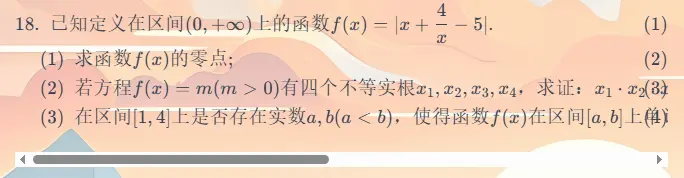
对于我这种经常发表数学文章的博主来说,博文中数学公式的渲染效果十分重要,然而在上图中每一行的最后面都多了一个行数标签,很明显这不是我想要的效果!所以这个问题不容迟疑,必须迅速解决!
显然,解决思路就是将这个行数标签设置为不可见,这里使用CSS即可,只需在 src/styles/markdown-extend.styl 文件中添加如下两行代码:
.eqn-num display: none !important现在问题就应该解决了!
友链页面添加排序说明
Firefly 默认的友链页面的描述语句是 “这里是我的朋友们,欢迎互相访问交流”,我想在其下方添加说明:“此处的友情链接均以添加至本站的时间先后顺序排列~”。最开始我尝试着在原来描述语句中注入HTML代码,但是很快发现这条路不行,因为 Firefly 默认会把描述语句转换为纯文本,所以我只好找到了友链页面的源代码文件 src/pages/friends.astro,
<!-- 页面标题和描述 --><div class="mb-4"> <div class="flex items-center gap-3 mb-3"> <div class="h-8 w-8 rounded-lg bg-(--primary) flex items-center justify-center text-white dark:text-black/70" > <Icon name="material-symbols:group" class="text-[1.5rem]" /> </div> <h1 class="text-3xl font-bold text-neutral-900 dark:text-neutral-100"> {title} </h1> </div> { description && ( <p class="text-base text-neutral-600 dark:text-neutral-400 leading-relaxed mb-4"> {description} </p> ) } <div class="mb-8 p-4 rounded-lg bg-(--primary)/8 dark:bg-(--btn-regular-bg) border border-(--primary)/30 dark:border-none backdrop-blur-xs shadow-xs usage-info-box"> <div class="flex items-start gap-2"> <Icon name="material-symbols:info-outline" class="text-(--primary) text-lg shrink-0 mt-0.5" /> <p class="text-sm text-neutral-700 dark:text-neutral-200 leading-relaxed"> <span class="font-semibold text-(--primary)"></span> 此处的友情链接均以添加至本站的时间先后顺序排列~ </p> </div> </div></div>这样就可以满足我想要的效果啦!
写在最后
这篇文章终于要结束了,不得不说,Firefly 这个主题确实很好看,也非常实用,在我心目中已经是很高的地位了。
同时也祝这篇文章能够真正帮到那些想将个人博客迁移至 Firefly 主题的同学们,期待各位同学的博客都能长久运行٩(•̤̀ᵕ•̤́๑)ᵒᵏᵎᵎᵎᵎ
如果说上一篇文章创下了内容最长纪录,那么这篇文章又将再次打破这个纪录!
这次写的文章真的比上次还要长好多,但是写起来并不会那么累——毕竟不是数学题了!
好的好的,2026年第二篇文章到此结束啦~
支持与分享
如果这篇文章对你有帮助,欢迎分享给更多人或赞助支持!


